MCP this, MCP that. Attack surface, gateways, and cMCP.

Your engineering, infra, or security team is wiring agents to tools inside real environments: GitHub, Stripe, Slack, cloud APIs, filesystem servers, whatever the agent needs to act. Same session. Fine.
The quieter question is MCP gateway security: once those tools are reachable, who is actually allowed to say no before the upstream runs?
An MCP security gateway sits between the agent client and upstream MCP servers. It evaluates each tools/call against policy (allow or deny), keeps an audit trail, and optionally attests that path in a TEE. Raw MCP is the protocol and the catalog. The gateway is the control plane that can refuse a specific call before credentials, files, or APIs get touched.
That is different from a dumb reverse proxy that only terminates TLS or multiplexes routes. Auth at the door is not authz on the tool. Approving an MCP server once is not the same as deciding whether read_file on .env should ever leave the client.
I poked at agentrust-io/cmcp and filed a few issues along the way. I ran the deny/allow/verify loop in software mode (CMCP_DEV_MODE=1) so you can feel the control without TEE hardware. Below: why the attack surface is ugly, how teams wire MCP today, what "MCP gateway" means in practice, then a concrete cMCP walkthrough.
Why MCP gateway security matters
MCP is how the agent reaches tools. It is not browsing your repo UI the way you do. It calls tools. Those calls can post into Slack, refund something on Stripe, read local envs and API keys, talk to your DB, or hit cloud APIs with credentials already sitting next to the workspace. A lot of that never shows up the way a normal human login would in your SIEM.
Once those MCP servers are in the session, the agent can reach databases, chat, PII, cloud stuff, whatever the tools wire up. The filesystem read_file path in this post is one concrete deny to show how the control works.
Beyond "someone approved this MCP server once," and blindly trusting the tool descriptions that reach the model, you are also trusting whatever that server does after approval, every other server in the same client session, and whatever credentials the agent can already reach.
This is not theoretical. Invariant Labs showed tool poisoning: malicious instructions buried in tool descriptions that steer the agent toward data reachable through other trusted servers. CVE-2025-54136 covered the rug-pull pattern where a benign MCP config gets approved, then swapped later without re-validation. There are more client and SDK CVEs in the wild. vulnerablemcp.info is a decent index if you want the longer list.
If you already think in layers of trust for CI and runtime, this rhyme is familiar. Artifact signatures do not prove process behavior (Runtime Trace). Approving an MCP server once does not prove the next tools/call is safe. Same class of gap as long-lived tokens that outlive the job (eradicate long-lived tokens): one approval, forever blast radius, until something in the path can refuse.
How teams wire MCP (and where it leaks)
Teams use MCP so the agent can actually act: read files, run shell, hit GitHub, drive a browser, talk to whatever else you plug in. Wiring it is the boring part. You add those MCP servers in Cursor or Claude Desktop, and the agent gets tools/call into the workspace and beyond.
Here are some common setups I have seen.
Filesystem MCP. @modelcontextprotocol/server-filesystem (or Cursor's own filesystem server) exposes tools like read_file / read_text_file, list_directory, search_files. Point it at a project root and the agent can open .env, ~/.aws/credentials, a kubeconfig, or a .npmrc with a registry token. Prompt injection, tool poisoning, or a confused "debug my auth" turn is enough to trigger the call. You usually find out after the keys are in the context window, or in a chat log, or pasted somewhere else.
Shell / terminal MCP. Same shape, worse blast radius. An agent that can run shell commands can cat .env, curl an exfil endpoint, or dump printenv. Approving "terminal access" once is not the same as approving every command the model invents later.
GitHub MCP. Useful for PRs and issues. Also useful for reading private repo contents, Actions logs that still hold secrets in plaintext, or opening a PR whose diff includes a token the agent just pulled from the filesystem server in the same session. Cross-server is the ugly sibling: one trusted server feeds another.
Browser MCP. Agent fills a form, pastes a token into a "debug" page, or uploads a file that should never leave the machine. Same approval model. Different egress.
For example Cursor, the path I actually exercised for this post is the filesystem one: Cursor Agent shaped traffic → filesystem-style read_file with path: ".env" → cMCP Cedar forbid → 403 POLICY_DENY before any upstream reads the file. Benign list_directory still goes through. Then TRACE verify.
.env exfil is the same class of mistake you already fight in Kubernetes, Vault, and IaC: credentials reachable by a process that should not be free to read them. Different transport.
What is missing in that setup is boring and important: tool-level deny (not only "this MCP server is approved"), and an attested audit trail that a verifier can check without trusting the operator's word.
MCP gateway vs raw MCP (and vs a dumb proxy)
Writeups from Tigera and Linx land on the same shape: put a front door in front of MCP so the agent does not talk straight to every server. Vendor docs already use the label: Ping's MCP security gateway, Lasso's open-source mcp-gateway, Microsoft's mcp-gateway and Agent Governance notes.
The security bar I care about is narrower than "we have a gateway product":
| Piece | Raw MCP client→server | Dumb proxy / router | MCP security gateway |
|---|---|---|---|
| Who can call tools | Whoever the client connected | Whoever can reach the proxy | Policy decides per tools/call |
| Server approval | Often one-time trust | Still one-time trust upstream | Catalog + policy, not vibes |
| Audit | Client logs, maybe | Access logs | Tool-level allow/deny + claim |
| Proof | Operator says so | Operator says so | Optional TEE / attested claim |
Auth at the door is not authz. You still need something that can deny a specific tools/call and leave an audit trail. That is the shape. Who ships it well is a different argument.
cMCP: Cedar policy, TRACE claims, TEE
cMCP (Confidential MCP Runtime) is open source, and yes it is different from "API gateway with MCP codecs."
It sits in front of the MCP servers, runs each tools/call through a Cedar policy, and either allows or denies. Software mode (CMCP_DEV_MODE=1) is enough to feel that. Hardware TEE is the attested version. LIMITATIONS.md is clear about the gap. Quickstart lives in the cMCP docs.
Sessions also mint a signed TRACE Claim (GatewayClaim): policy hash, runtime measurement, audit tip, Ed25519 signature. Software mode signs it. TEE attests it.
Approved tools map to upstream identity. First-contact catalog drift detection is shipped. Continuous mid-session re-list is intentionally not. Cross-channel instruction splitting (tool description + tool results) is called out as a residual gap in LIMITATIONS.
How to wire cMCP: deny read_file, allow list_directory, verify
I ran this against cmcp-runtime v0.5.0 in software mode. The client is curl standing in for Cursor Agent: same JSON-RPC tools/call shape, with _cmcp.workflow_id set to cursor-agent so Cedar can scope the session the way a Cursor→cMCP bridge would stamp it. Cursor does not invent that string for you today. You configure the gateway client path (or a thin adapter) to send it.
The upstream is a filesystem MCP server: catalog tools named read_file and list_directory, matching @modelcontextprotocol/server-filesystem (and the older read_file alias still registered next to read_text_file). It listens on :9001 behind the gateway. No real .env on disk for the deny path. Cedar never lets that call leave the gateway.
Policy grain: this path is tool-level. Cedar forbids Resource::"read_file" entirely. It does not match on arguments.path == ".env". The curl still sends path: ".env" because that is the leak story. Path-level Cedar (deny only secret paths, allow README) needs call-argument context in the evaluation record. Tool-level is still enough to stop the filesystem read tool before upstream.
Prerequisites
- Python 3.11+ (I used 3.14.7), pip, curl
- Three terminals: cMCP gateway, client (curl), and the upstream filesystem MCP (
list_directoryneeds the upstream, deny-only does not)
Layout to create
cmcp-walk/
  cmcp-config.yaml
  catalog.json
  filesystem_mcp.py
  record_approved_hashes.py
  policies/
    manifest.json
    schema.cedarschema
    cursor.cedar
Install
python3 -m venv cmcp-env
source cmcp-env/bin/activate
python3 -m pip install cmcp-runtime==0.5.0
cd cmcp-walk   # your working directory with the files below
Config
cmcp-config.yaml:
attestation:
  provider: auto
  enforcement_mode: enforcing
policy_bundle_path: ./policies/
catalog_path: ./catalog.json
listen_addr: "127.0.0.1:8443"
audit_db_path: ./audit.db
Pin listen_addr to loopback. Tokenless CMCP_DEV_MODE=1 is loopback-only on purpose. From 0.4.0 a wider bind without CMCP_BEARER_TOKEN is refused.
Cedar + schema + manifest
policies/cursor.cedar:
// Cursor Agent sessions stamp workflow_id=cursor-agent on the gateway client path.
permit (
  principal,
  action,
  resource
) when {
  context.workflow_id == "cursor-agent"
};

// Tool-level deny matching @modelcontextprotocol/server-filesystem's read_file.
// Path-level matching on arguments.path is not in this quick Cedar context.
forbid (
  principal,
  action,
  resource == Resource::"read_file"
);
policies/schema.cedarschema:
{"cMCP":{"entityTypes":{"Principal":{"memberOfTypes":[],"shape":{"type":"Record","attributes":{"session_id":{"type":"String","required":true},"workflow_id":{"type":"String","required":true}}}},"Resource":{"memberOfTypes":[],"shape":{"type":"Record","attributes":{"tool_name":{"type":"String","required":true}}}}},"actions":{"call_tool":{"appliesTo":{"principalTypes":["cMCP::Principal"],"resourceTypes":["cMCP::Resource"],"context":{"type":"Record","attributes":{"session_max_sensitivity":{"type":"String","required":true},"workflow_id":{"type":"String","required":true}}}}}}}}
policies/manifest.json:
{
  "version": "0.1.0",
  "authored_at": "2026-09-20T00:00:00Z",
  "author_identity": "abdulmalik@saintmalik.me",
  "commit_sha": "filesystem-mcp"
}
Catalog (filesystem MCP tools)
catalog.json:
You only hand-write the server block and approved_definition (paste or adapt from the MCP server tool schema / tools/list). definition_hash is not something you invent; it is SHA-256 of the canonical JSON for that definition. The example hashes below are already computed so this file loads as-is. If you edit a definition, re-run the hash snippet already in this post.
[
  {
    "tool_name": "read_file",
    "server": {
      "display_name": "Filesystem MCP",
      "url": "http://localhost:9001/mcp",
      "tls_fingerprint": "SHA256:AAAAAAAAAAAAAAAAAAAAAAAAAAAAAAAAAAAAAAAAAAA=",
      "transport": "http-sse"
    },
    "approved_definition": {
      "description": "Read the complete contents of a file as text. Same shape as @modelcontextprotocol/server-filesystem read_file / read_text_file.",
      "input_schema": {
        "type": "object",
        "required": ["path"],
        "properties": {
          "path": {
            "type": "string",
            "description": "Path to the file to read"
          }
        }
      },
      "output_schema": {
        "type": "object",
        "properties": {
          "content": { "type": "string" }
        }
      }
    },
    "definition_hash": "sha256:9bca1022ec7ce05a43d356ce714bbdb8c58b110de77d2331c8abb9b6d1c14789",
    "compliance_domain": "internal",
    "requires_baa": false,
    "sensitivity_level": "confidential",
    "added_at": "2026-09-20T00:00:00Z",
    "approved_by": "abdulmalik@saintmalik.me"
  },
  {
    "tool_name": "list_directory",
    "server": {
      "display_name": "Filesystem MCP",
      "url": "http://localhost:9001/mcp",
      "tls_fingerprint": "SHA256:AAAAAAAAAAAAAAAAAAAAAAAAAAAAAAAAAAAAAAAAAAA=",
      "transport": "http-sse"
    },
    "approved_definition": {
      "description": "List directory contents with [FILE] or [DIR] prefixes. Same shape as @modelcontextprotocol/server-filesystem list_directory.",
      "input_schema": {
        "type": "object",
        "required": ["path"],
        "properties": {
          "path": {
            "type": "string",
            "description": "Directory path to list"
          }
        }
      },
      "output_schema": {
        "type": "object",
        "properties": {
          "content": { "type": "string" }
        }
      }
    },
    "definition_hash": "sha256:205d9f1c37502085b8d75e779e1b86722c6d1e9430807cdbb531862d565bf540",
    "compliance_domain": "public",
    "requires_baa": false,
    "sensitivity_level": "public",
    "added_at": "2026-09-20T00:00:00Z",
    "approved_by": "abdulmalik@saintmalik.me"
  }
]
If you edit an approved_definition, recompute its definition_hash or the runtime rejects the entry at startup:
python3 -c "
import json, hashlib
d = {
  'description': 'YOUR DESCRIPTION',
  'input_schema': {'type': 'object', 'properties': {}},
  'output_schema': {'type': 'object', 'properties': {}}
}
s = json.dumps(d, sort_keys=True, separators=(',', ':'), ensure_ascii=True)
print('sha256:' + hashlib.sha256(s.encode()).hexdigest())
"
Filesystem MCP upstream + hash recorder
filesystem_mcp.py:
#!/usr/bin/env python3
import json
from http.server import BaseHTTPRequestHandler, HTTPServer

class H(BaseHTTPRequestHandler):
    def log_message(self, *a):
        pass

    def do_POST(self):
        n = int(self.headers.get("Content-Length", 0))
        msg = json.loads(self.rfile.read(n) or b"{}")
        body = json.dumps(
            {
                "jsonrpc": "2.0",
                "id": msg.get("id"),
                "result": {
                    "content": [
                        {"type": "text", "text": "[FILE] README.md\n[DIR] src"}
                    ]
                },
            }
        ).encode()
        self.send_response(200)
        self.send_header("Content-Type", "application/json")
        self.send_header("Content-Length", str(len(body)))
        self.end_headers()
        self.wfile.write(body)

if __name__ == "__main__":
    print("filesystem MCP listening on :9001", flush=True)
    HTTPServer(("127.0.0.1", 9001), H).serve_forever()
record_approved_hashes.py:
#!/usr/bin/env python3
import json
from pathlib import Path
from cmcp_runtime.catalog.loader import load_catalog
from cmcp_runtime.policy.bundle import load_policy_bundle

approved = {
    "policy_bundle_hash": load_policy_bundle("policies").bundle_hash,
    "tool_catalog_hash": load_catalog("catalog.json").catalog_hash,
}
Path("approved-hashes.json").write_text(json.dumps(approved, indent=2) + "\n")
print(json.dumps(approved, indent=2))
Validate, pin hashes, start
cmcp validate-config --config cmcp-config.yaml
# expect: ✓ Config valid: cmcp-config.yaml

python3 record_approved_hashes.py
When I ran it with the files above:
{
  "policy_bundle_hash": "sha256:da3ddd048f59b1a93adb4385bd5be00825e0cc1423e73e745f7dc758c2b9322a",
  "tool_catalog_hash": "sha256:eeb8ada5b053184239cb9011d336106b7e3da4f26416ee6e175d7c5df27af32b"
}
Keep that approved-hashes.json. You will pin those values at verify time.
Terminal 1. Start the gateway and leave it open:
CMCP_DEV_MODE=1 cmcp start --config cmcp-config.yaml
You will see the "no hardware TEE / software-only" warnings. Expected. Then uvicorn on 127.0.0.1:8443:
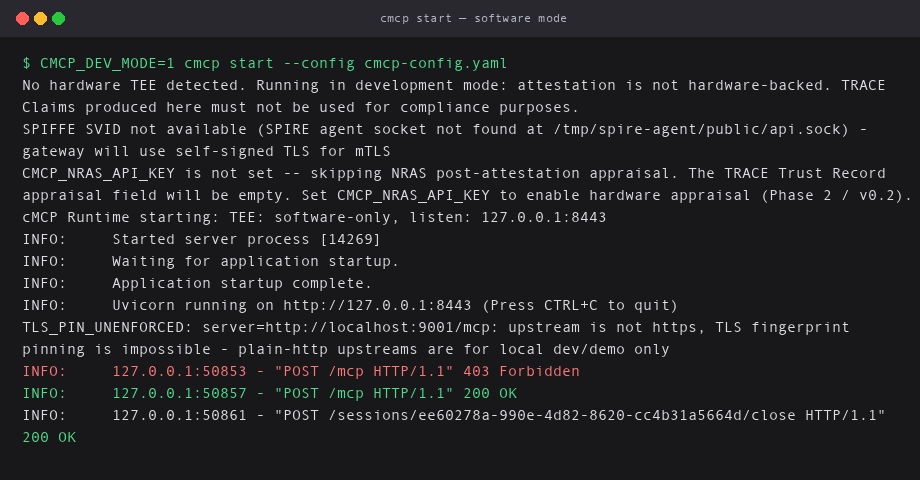
Gateway startup in software mode. No hardware TEE. Listen on loopback only.
Blocked call: read_file on .env (no upstream needed)
In terminal 2. This is the Cursor Agent / filesystem MCP leak call, as JSON-RPC:
curl -i -X POST http://localhost:8443/mcp \
  -H "Content-Type: application/json" \
  -d '{
    "jsonrpc": "2.0",
    "id": 1,
    "method": "tools/call",
    "params": {
      "name": "read_file",
      "arguments": {"path": ".env"},
      "_cmcp": {"session_id": "cursor-session-001", "workflow_id": "cursor-agent"}
    }
  }'
When you hit deny you should see HTTP/1.1 403 Forbidden and POLICY_DENY. That is the whole point: a filesystem read_file stopped at the policy boundary before any upstream runs and before the file is read. The upstream filesystem MCP is not required for this step.
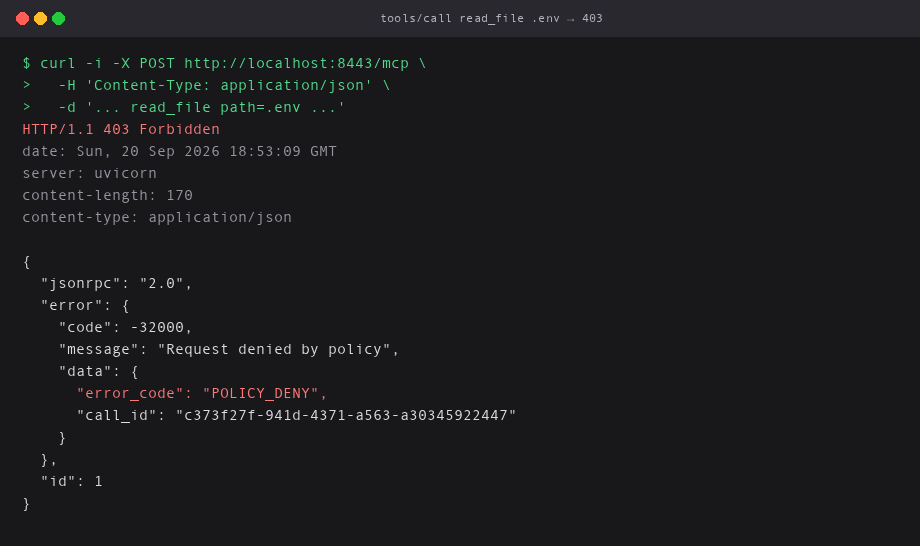
read_file with path: ".env" → 403 Forbidden / POLICY_DENY. Cedar forbid wins before upstream.
Allowed call: list_directory (upstream)
Terminal 3. Start the filesystem MCP:
python3 filesystem_mcp.py
# filesystem MCP listening on :9001
Back in terminal 2:
curl -i -X POST http://localhost:8443/mcp \
  -H "Content-Type: application/json" \
  -d '{
    "jsonrpc": "2.0",
    "id": 2,
    "method": "tools/call",
    "params": {
      "name": "list_directory",
      "arguments": {"path": "."},
      "_cmcp": {"session_id": "cursor-session-001", "workflow_id": "cursor-agent"}
    }
  }'
You should get HTTP/1.1 200 OK, a directory listing, and a _cmcp audit block with would_have_denied: false. Policy matched workflow_id == "cursor-agent", gateway forwarded, upstream answered.
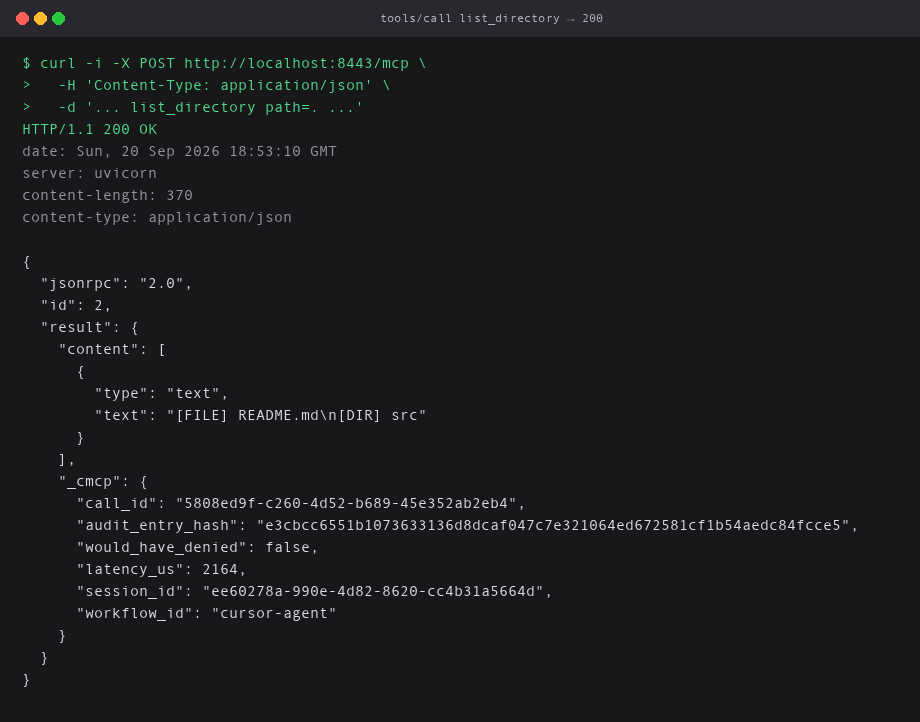
list_directory → 200 OK. Upstream filesystem MCP answers. Gateway attaches _cmcp audit metadata.
TRACE Claim and verify
Closing takes the session's internal UUID, not the label cursor-session-001:
SESSION_UUID=$(curl -s "http://localhost:8443/audit/export?session_id=cursor-session-001" \
  | python3 -c "import sys, json; print(json.load(sys.stdin)['entries'][0]['session_id'])")

curl -s -X POST "http://localhost:8443/sessions/$SESSION_UUID/close" \
  | python3 -m json.tool > claim.json
My gateway.call_summary:
{
  "tool_calls_total": 2,
  "tool_calls_allowed": 1,
  "tool_calls_denied": 1,
  "tool_calls_faulted": 0,
  "tools_invoked": [
    "list_directory",
    "read_file"
  ]
}
cmcp verify claim.json
Software checks PASS. Hardware attestation FAIL. Overall RESULT: FAIL (partially_verified). That is the honest software-mode answer:
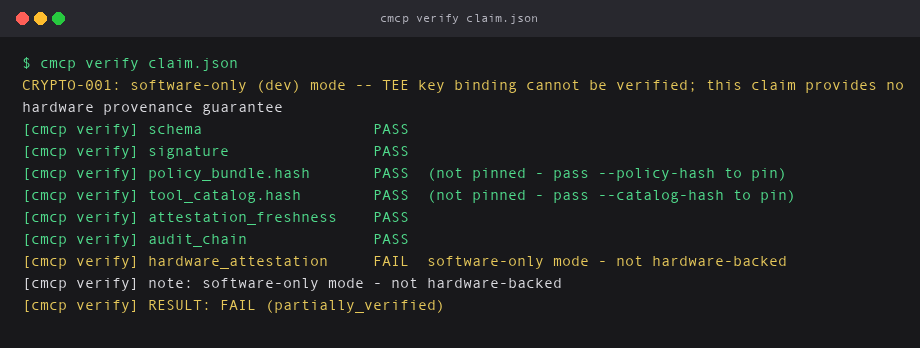
Software checks PASS. Hardware attestation FAIL. partially_verified is the honest software-mode answer.
Pin the hashes you recorded before startup:
cmcp verify claim.json \
  --policy-hash "$(python3 -c "import json; print(json.load(open('approved-hashes.json'))['policy_bundle_hash'])")" \
  --catalog-hash "$(python3 -c "import json; print(json.load(open('approved-hashes.json'))['tool_catalog_hash'])")"
Software checks still PASS. Hardware attestation still FAIL. partially_verified is the honest answer for software mode. This walkthrough proves the policy path (deny, allow, claim shape).
Software mode (CMCP_DEV_MODE=1) still denies and allows. Verify just lands on partially_verified: signed claim, no hardware provenance. TEE is when you need that claim to stand up to auditors without trusting the operator.
Conclusion
MCP noise is real. MCP risk is also real: poisoned tools, rug pulls, client CVEs.
An MCP security gateway is the right shape when you need a front door, tool-level policy, and an attributable audit trail. Vendor essays and product pages are useful for framing. They are not the definition of done.
I walked deny read_file + allow list_directory + verify above in software mode so you can feel the Cedar control without buying hardware first. That core path exists today. Full estate IGA and mesh routing do not. Phase 2 server attestation and some transparency work are next.
If you are wiring Cursor Agent (or Claude) to filesystem, shell, GitHub, or browser MCP tools, start with a deny-by-default catalog, treat every server as hostile until proven otherwise, and put something in the path that can say no before the upstream reads your local envs, PII, and more. Then decide whether your proof requirement is "we logged it" or "a verifier can check the enclave measurement without trusting us."
Those are different products. Call them by their real names.
A few questions I keep getting
Is an MCP gateway just an API gateway with MCP codecs? Usually no. TLS termination and route multiplexing help operations. MCP gateway security is about evaluating tools/call (and often the approved catalog) before upstream runs.
Is approving the MCP server in Cursor enough? No. That is server-level trust. Tool poisoning, rug pulls, and cross-server exfil all sit past that checkbox.
Does CMCP_DEV_MODE=1 count as production proof? It counts for learning the deny/allow path and the claim shape. Hardware attestation still fails in software mode on purpose. TEE is when you need a verifier who does not have to trust the operator.
Well, that's it. I hope you find this useful. Drop a comment if you hit a weird verify result or a Cedar quirk. I am curious what breaks for other setups.
Related on this blog: Runtime Trace process attestation, eradicate long-lived tokens, CI/CD runtime with cicd-sensor.
Till next time, Peace be on you 🤞🏽
References
- https://modelcontextprotocol.io/
- https://github.com/agentrust-io/cmcp
- https://github.com/agentrust-io/cmcp/blob/main/docs/quickstart.md
- https://github.com/agentrust-io/cmcp/blob/main/docs/spec/cedar-policy.md
- https://github.com/modelcontextprotocol/servers/tree/main/src/filesystem
- https://invariantlabs.ai/blog/mcp-security-notification-tool-poisoning-attacks
- https://nvd.nist.gov/vuln/detail/CVE-2025-54136
- https://vulnerablemcp.info/
- https://www.tigera.io/learn/guides/llm-security/mcp-gateway/
- https://docs.pingidentity.com/pinggateway/2026/mcp/index.html
- https://github.com/lasso-security/mcp-gateway
- https://github.com/microsoft/mcp-gateway